
Microsoft 365 Outage: Can Your Business Keep Operating When Cloud Services Go Down?

Microsoft 365 outage at a glance
| 12 Nov | 13 Nov | 74 | 130,000+ |
| Incident began | Disruption continued | Countries and territories with reports | Peak US Outlook reports |
Downdetector figures are user-submitted reports, not a verified count of unique affected people or businesses. The 74-country figure refers to locations where reports were recorded, not confirmed national service outages
Key Takeaways
- Cloud service availability should not be treated as a substitute for business continuity planning.
- Disruption to one platform can affect several connected applications and business processes.
- Organisations should identify critical technology dependencies and understand the operational impact of an outage.
- Alternative communication channels and documented workarounds can help maintain essential operations.
- Backup, disaster recovery and business continuity address different aspects of operational resilience.
- Regular testing is necessary to establish whether an organisation can continue operating during a technology disruption.
Table of Contents
Introduction
The Microsoft 365 disruption on 12 and 13 November 2026 has highlighted an important question for businesses: how prepared are organisations when the cloud services they depend on become unavailable?
For many organisations, Microsoft 365 is central to daily operations. Employees use Outlook for business communication, Teams for collaboration, SharePoint for document management and other Microsoft applications to manage projects, information and workflows.
When these services experience disruption, the impact can extend beyond an inaccessible inbox. Employees may struggle to communicate with customers, access information, coordinate teams or complete routine business processes.
The recent outage affected users across multiple regions, including the UAE. It serves as a reminder that cloud adoption should go hand in hand with business continuity planning and operational resilience.
At the time of reporting, Microsoft's recovery efforts were continuing and the company had described only limited or partial recovery in some regions. Organisations should consult Microsoft's service-health information for the latest position before making operational decisions.
What happened during the Microsoft 365 outage?
On 12 November 2026, Microsoft began investigating connectivity issues affecting Exchange Online. Microsoft tracked the wider disruption under incident MO1550821, which affected Exchange Online and features across several connected Microsoft 365 services. The disruption continued into 13 November, affecting users across the Americas and Asia-Pacific. Reported service impacts included:
| Service | Reported impact |
| Exchange Online and Outlook | Users experienced difficulties accessing mailboxes through several connection methods, alongside delayed email delivery. |
| Microsoft Teams | Some calendar, meeting-scheduling and organisation-specific chat scenarios were affected. Core messaging and online meetings largely continued to work. |
| SharePoint Online | Some features dependent on Exchange Online were affected, while direct access to stored SharePoint files remained functional. |
| Microsoft 365 Copilot | Some users experienced problems loading Copilot Chat and accessing organisational work data. |
| Planner and To Do | Some plan, task and application operations experienced reliability issues. |
| Defender, Purview, Graph, Power BI and other services | Selected security, compliance, API, administration and reporting functions were affected. |
Microsoft's investigation identified a process responsible for establishing secure connections on affected servers becoming overwhelmed, causing servers to stop processing requests. Microsoft also reported that some servers had become unexpectedly unavailable after automated health checks failed. The resulting reduction in available server capacity increased load on the remaining infrastructure.
Recovery work included redistributing traffic, restarting affected servers, restricting certain traffic and testing configuration changes on a subset of servers. Microsoft also investigated a recent network configuration change that coincided with the start of the disruption.
These findings describe Microsoft's investigation at the time of reporting; they should not be presented as a final root-cause conclusion. Microsoft said it had no indication that malicious activity caused the incident.
What the outage reports tell us
Downdetector recorded more than 130,000 reports of Outlook problems in the United States around 1 pm Eastern Time on 12 November. Gulf News reported that the number had fallen to approximately 37,000 by 6 pm Eastern Time. Downdetector recorded reports involving Microsoft products in 74 countries and territories.
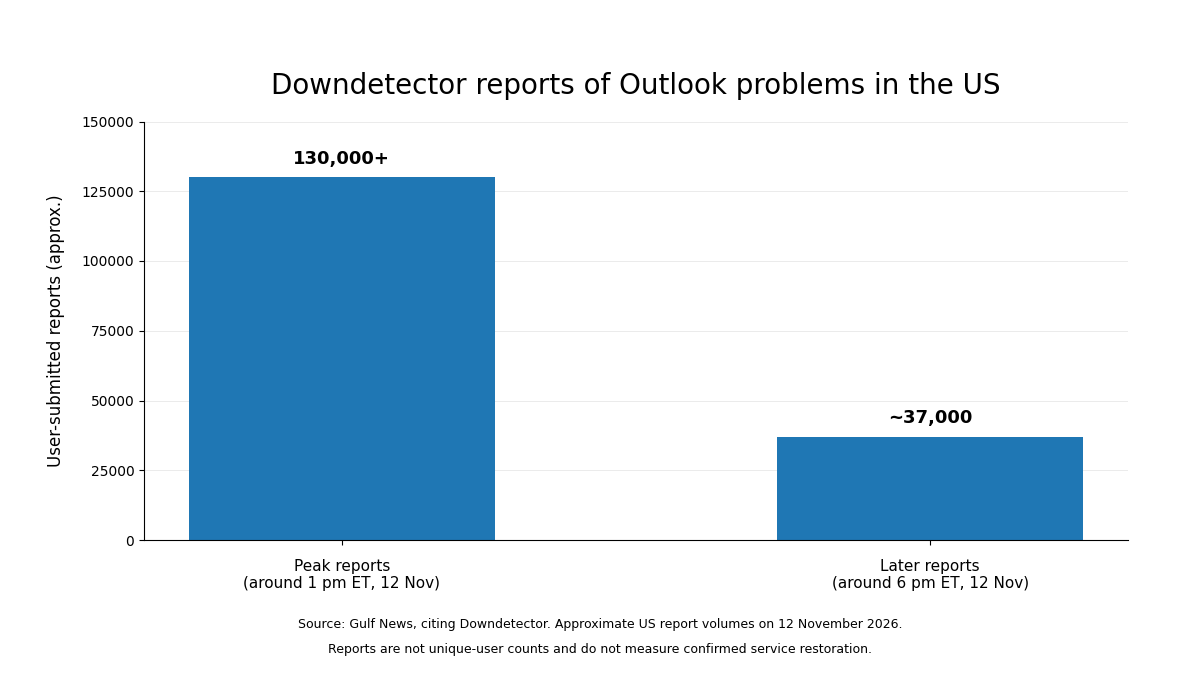
Figure 1. Approximate US Downdetector reports of Outlook problems at two reported points on 12 November 2026. Source: Gulf News, citing Downdetector. These are report volumes, not unique users or a measure of confirmed service restoration.
The Microsoft 365 outage and its impact on UAE businesses
The disruption was not limited to users in the United States or Europe. Gulf News reported that Outlook, Microsoft 365 and Teams were among the most-reported services on Downdetector's UAE site on the morning of 13 November, with a sharp increase in complaints.
For organisations operating in the UAE, the incident highlights a practical concern: business operations increasingly depend on connected cloud platforms, even when employees, customers and suppliers are spread across different locations.
Consider an organisation operating from Dubai with teams in Abu Dhabi and other Emirates. Its finance department may use Outlook to communicate with suppliers, its operations team may depend on Teams for internal coordination, and its management team may access reports and documents through Microsoft 365.
If access to these services is interrupted, supplier communication, internal approvals and customer support may be delayed. The impact will vary according to the organisation's applications, integrations and business processes. The underlying question remains: how can essential operations continue when a technology service becomes unavailable?
Why a single cloud service disruption can affect multiple business operations
Modern business applications rarely operate in isolation. An organisation might use Outlook for communication, Teams for collaboration, SharePoint for document management and Copilot to retrieve information. These applications may rely on shared services, identities, integrations and underlying infrastructure.
Consequently, a disruption affecting one component can have a wider operational impact. A business does not simply need its applications to open. It needs employees to be able to complete the work those applications support.
This is why organisations should map dependencies between applications, identity services, connectivity, data and business workflows rather than assessing each product in isolation.
The business risks organisations should consider
1. Communication and customer service disruption: Email remains an important business communication channel. An outage can delay customer enquiries, supplier correspondence, approvals and internal instructions. Organisations should establish alternative communication arrangements for critical contacts and operational teams.
2. Reduced access to business information: Cloud platforms often act as central repositories for documents, reports and operational information. If access is interrupted, employees may struggle to retrieve information required for decision-making and daily activities. Identify which information must remain accessible during an outage and establish appropriate alternatives.
3. Disruption to connected applications and workflows: The impact of a cloud outage can extend beyond the application experiencing the initial problem. Integrations, authentication services, APIs and connected business applications may depend on the affected platform. IT teams should assess complete business workflows rather than reviewing individual applications in isolation.
4. Operational delays and productivity losses: Even a temporary disruption can create a backlog of work. Delayed approvals, missed communications, interrupted meetings and incomplete transactions may require additional time to resolve after services return. Organisations should decide which processes can temporarily use alternative procedures and which must wait for the affected technology.
5. Dependence on a single technology provider: Cloud platforms offer accessibility, scalability and reduced infrastructure management requirements. However, relying on one provider for several critical business functions can create a concentration of operational risk. This does not mean organisations should avoid cloud platforms; it means they should understand their dependencies and plan how critical operations can continue.
How can businesses prepare for cloud service outages?
Organisations cannot prevent every third-party service disruption. They can, however, reduce the operational impact through appropriate planning.
1. Identify critical services and technology dependencies: Identify the applications and services employees need to perform essential business functions. Map dependencies involving email, identity and authentication, cloud storage, collaboration tools, finance systems, customer relationship management platforms, third-party integrations and APIs.
2. Establish alternative communication channels: Businesses should not rely entirely on one communication platform for critical operational instructions. Consider documented alternatives such as telephone contact lists, approved messaging channels and emergency communication procedures. Employees should know which channel to use, who communicates updates and how urgent matters should be escalated.
3. Develop and test business continuity procedures: A business continuity plan should explain how essential operations will continue when normal technology services are unavailable. It should identify critical activities, responsible employees, alternative working procedures, communication and escalation arrangements, acceptable disruption periods and conditions for returning to normal operations. The plan should be accessible even when the primary cloud environment is unavailable.
4. Review backup and disaster recovery arrangements: Backup and disaster recovery are important parts of technology resilience, but they solve different problems. Backup protects information through recoverable copies. Disaster recovery focuses on restoring technology services following a disruption. Neither automatically guarantees continued access to a third-party cloud service experiencing an outage. Review what backup arrangements cover, how quickly critical systems can be restored and which dependencies must be available for recovery.
For a closer look at the difference between a completed backup and a recoverable business service, read LITC ME's guide to backup and recovery.
5. Understand recovery time and business impact: Different systems have different levels of importance. Define realistic Recovery Time Objectives (RTOs) and Recovery Point Objectives (RPOs) for systems where they apply. These objectives help establish acceptable downtime and data recovery expectations.
6. Test scenarios involving third-party service disruption: Conduct practical exercises that simulate the unavailability of important cloud services. Ask whether employees can access essential contact information, communicate with customers, retrieve required documents and continue critical processes if Microsoft 365 becomes unavailable. Record gaps, assign responsibilities and update the plan.
Cloud resilience requires more than service availability
The Microsoft 365 incident highlights an important distinction between cloud adoption and cloud resilience. Moving applications and infrastructure to the cloud can improve accessibility, simplify management and support business growth. However, it does not eliminate the possibility of service disruption.
Resilience depends on understanding the complete technology environment, including third-party services, application dependencies, connectivity, access controls, recovery arrangements and operational responsibilities.
For organisations with multiple offices, network design is part of this discussion. A well-designed SD-WAN architecture for UAE enterprises can help manage connectivity across more than one internet link and route traffic around a failed connection. This can improve resilience against a local connectivity failure, although it cannot prevent an outage inside a cloud provider's own service.
Resilience also starts before services go live. A structured cloud migration strategy for UAE businesses should map application dependencies, access requirements, data protection, compliance and operational support so that the cloud environment is designed around business needs.
For organisations opening or operating across several locations, planning the IT behind a new UAE branch also means considering connectivity, user access, applications, security and support before the office begins operating.
For organisations operating across the UAE and GCC, these considerations are particularly relevant where employees, customers, suppliers and business operations depend on connected cloud services. The objective is not to eliminate every possible disruption. It is to understand exposure, establish appropriate alternatives and recover in a controlled manner.
How Live in the Cloud ME supports business and IT resilience
At Live in the Cloud ME, we recognise that technology availability is closely connected to business continuity and operational performance. A resilient IT environment requires more than deploying cloud platforms. Organisations need visibility into their infrastructure, an understanding of critical dependencies and appropriate arrangements for managing disruption.
This may involve reviewing cloud infrastructure and application dependencies, assessing network connectivity and alternative access arrangements, evaluating backup and disaster recovery requirements, and ensuring that IT support and incident escalation processes align with business needs.
The right approach will depend on the organisation's technology environment, business requirements and tolerance for disruption. A structured review can help identify potential gaps and prioritise improvements based on operational needs.
Conclusion: prepare for disruption, not just deployment
The November 2026 Microsoft 365 outage is a reminder that even established cloud platforms can experience unexpected service interruptions. For businesses, the bigger concern is not simply whether a particular application becomes unavailable. It is whether employees can continue working, customers can still be supported and essential operations can be maintained.
Cloud adoption should therefore be accompanied by a clear understanding of technology dependencies, tested continuity procedures and realistic recovery arrangements.
The question organisations should ask is not simply, “How reliable is our cloud provider?” It is, “What happens to our business when the services we depend on are unavailable?”
Resources and further reading
The following sources support the incident facts and figures used in this article:
- Reuters – Microsoft scrambles to restore services as global outage hits thousands of users
- Gulf News – Microsoft outage explained: What went wrong with Outlook and Teams, and how it is hitting UAE users
- Business Standard – Microsoft 365 outage continues as company sees limited recovery in services
- Microsoft 365 Service Health
Review your IT and business continuity readiness
Live in the Cloud ME helps organisations assess their IT environments, infrastructure dependencies, managed services and technology requirements to support reliable business operations.