
Your Backup Completed Successfully. But Can Your Business Actually Recover?
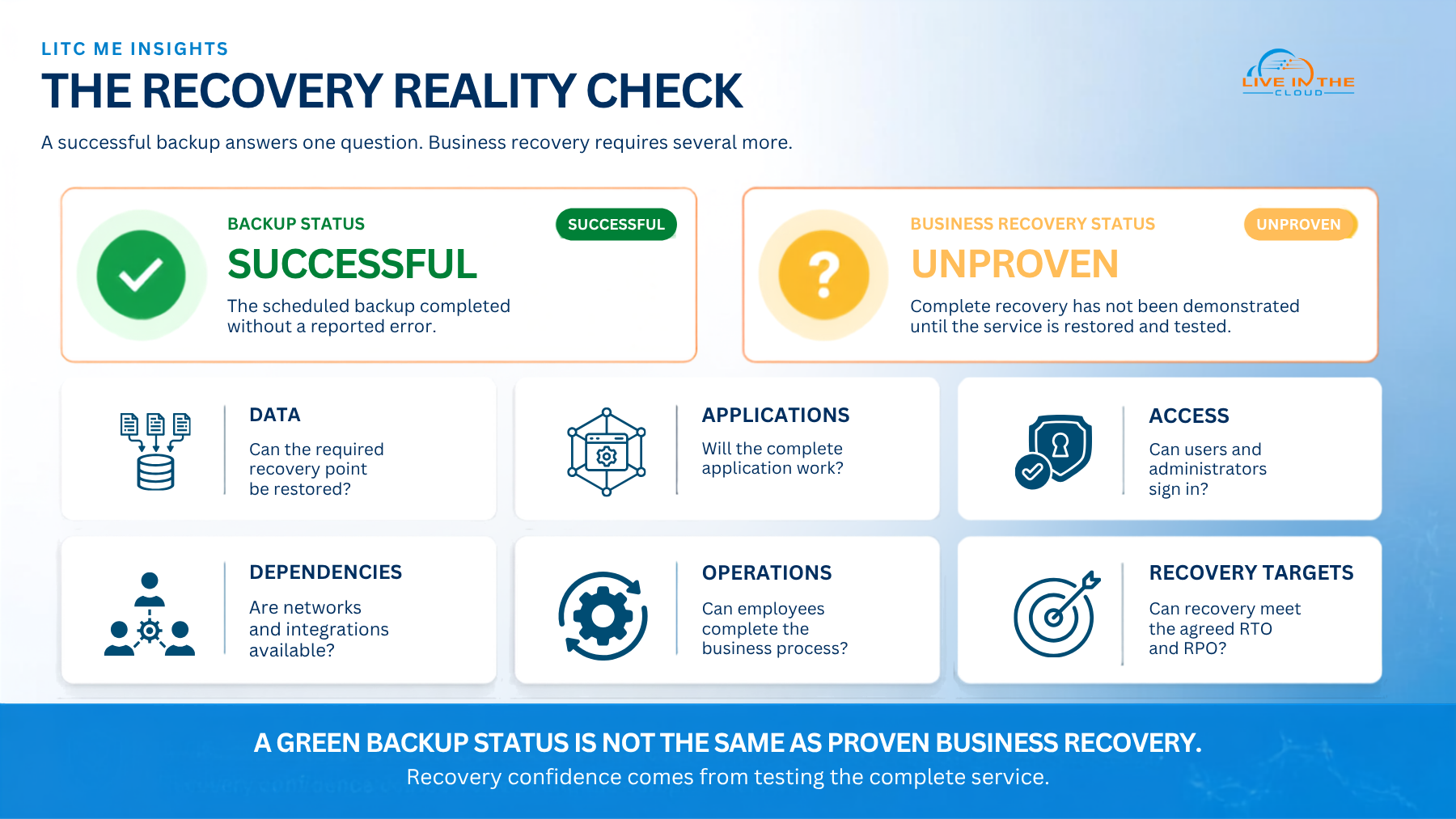
A green tick beside a completed backup job can be reassuring. It shows that a backup process ran and did not report a failure. But that notification answers only one narrow question: was data copied?
It does not tell you whether the copy is complete, whether it can be restored, whether the application will work afterwards or whether employees can resume the business process that depends on it. For organisations operating across the UAE and GCC, where critical services often span cloud platforms, on-premises systems, branch locations and third-party applications, that distinction matters.
Backup protects a copy of information. Recovery is the coordinated ability to return data, applications, infrastructure, access and operations to a usable state. A business can therefore have successful backups and still experience a failed recovery.
Table of Contents
Why a Successful Backup Does Not Guarantee Recovery
A backup job normally validates a technical task. It may confirm that selected files, databases, virtual machines or system data were copied to a defined destination. Recovery has a much wider scope because the business does not operate from isolated data files. It operates through complete services.
An accounting database, for example, may depend on an application server, user identities, network connectivity, certificates, storage permissions, software licences and integrations with banking, payroll or customer systems. Restoring the database without those dependencies may create an environment that is technically present but operationally unusable.
The gap between backup and recovery
|
A backup report may confirm
|
Business recovery must prove
|
| A scheduled job completed | The required service can be restored end to end |
| Selected data was copied | The correct data, configuration and dependencies are available |
| A recovery point exists | The recovery point is clean, readable and appropriate |
| The backup destination was reachable | Authorised responders can reach it during an incident |
A successful backup is evidence of backup activity. A successful recovery test is evidence of business recoverability.
Hidden dependencies can delay restoration
Recovery may stall because identity services, domain name services, firewall rules, encryption keys, certificates, administrative credentials, application configurations or supplier connections are unavailable. These components are easy to overlook because they sit behind the visible application.
The order of recovery matters
Systems often need to return in a defined sequence. Restoring an application before its identity, database or network dependencies are ready can waste time and complicate troubleshooting. Recovery priorities should also reflect business impact rather than the size or visibility of a server.
The backup may share the same risk
If production systems and backups rely on the same accounts, permissions or administration path, one incident may affect both. Recovery planning should consider how authorised teams will reach protected copies if normal identities, networks or management tools are unavailable.
A restored system is not always a recovered service
A server may start successfully while users remain unable to sign in, integrations fail, transactions are inconsistent or the restored environment is unsafe to reconnect. Recovery is complete only when the service is usable, validated and approved for operations.
Consider a hypothetical multi-site distributor operating across the UAE. Its nightly report shows that the ERP database and virtual machines were backed up successfully. Following a serious outage, the database is restored, but order processing remains unavailable because an integration credential is missing, the identity service was not included in the recovery sequence and the warehouse interface cannot reconnect. The backup succeeded. The business service did not recover.
How to Know Whether Your Business Can Recover
The strongest evidence of recovery readiness is not a dashboard or policy document. It is a controlled, repeatable test in which a critical service is restored and validated against business expectations. The following checks help turn backup activity into a practical recovery capability.
Start with critical business services
Identify which customer, finance, operations, communications and workforce activities must return first. This creates a recovery order based on business impact rather than technical convenience.
Agree the acceptable downtime and data loss
Define the targeted time to restore each critical service and the amount of recent data the business can tolerate losing. These expectations are often described as the recovery time objective, or RTO, and recovery point objective, or RPO.
Confirm the full recovery scope
Check that protection covers the data, system state, configurations and other components required to rebuild a usable service. Include cloud services, employee-held information and specialist applications where they support critical operations.
Map dependencies and the restoration sequence
Document identities, networks, certificates, licences, integrations, suppliers and administrative access. Show which components must return first and who owns each action.
Protect the route to recovery
Review whether backup copies and recovery administration are sufficiently separated from everyday production access. Ensure authorised responders have a secure, documented route to recovery resources during a wider outage.
Test a complete service
Move beyond isolated file restores. Run a realistic exercise that restores the application, its data and required dependencies in the correct sequence. Include constraints that could occur during an actual incident.
Ask business users to validate the result
The technical team can confirm that systems are running, but service owners should confirm that users can sign in, access current information and complete the intended business process.
Measure, record and improve
Compare the actual recovery time and recovered data with the agreed objectives. Record delays, manual work, missing information and decisions that slowed the test, then assign actions and retest.
Questions leaders should be able to answer
- Which business service must be recovered first?
- How long can that service remain unavailable?
- How much recent data could the business tolerate losing?
- When was the complete service last restored successfully?
- Can recovery proceed if normal administrator accounts are unavailable?
- Who can declare a disaster and approve the return to service?
- What evidence shows that current recovery objectives are achievable?
The LITC ME Approach
Live in the Cloud ME helps organisations treat backup, disaster recovery and business continuity as connected operational capabilities. LITC begins with the business services that matter most, then assesses the technologies, access paths and dependencies required to recover them.
Depending on the organisation’s environment and priorities, the engagement may include:
- Identifying critical services and recovery priorities
- Reviewing backup coverage, retention and recovery access
- Mapping applications, infrastructure, identities and third-party dependencies
- Helping business and technology owners define realistic RTO and RPO expectations
- Designing recovery architecture for cloud, on-premises or hybrid environments
- Developing practical recovery procedures and escalation paths
- Running controlled restoration exercises with business-user validation
- Reviewing test evidence and prioritising improvements
- Providing ongoing monitoring, management and recovery governance
The objective is not to force every organisation into the same platform or recovery model. It is to design an approach around business impact, technical reality, risk tolerance and operational responsibility. This consulting-led approach helps leadership understand what can be recovered, under what conditions and with what evidence.
Conclusion: Move from Backup Confidence to Recovery Confidence
A green tick shows that a backup task completed. It does not show that departments can work, customers can be served or critical operations can continue after disruption.
Real recovery confidence comes from identifying essential services, understanding their dependencies, agreeing realistic objectives and testing the complete path back to operation. For UAE and GCC organisations with hybrid infrastructure, multiple sites and interconnected applications, this is a business resilience discipline, not simply an IT maintenance task.
The question leadership should ask is not, “Did last night’s backup complete?” It is, “What evidence do we have that the business can recover?”
Review Your Recovery Readiness
Live in the Cloud ME can help assess your critical services, backup coverage, recovery objectives, dependencies and testing approach, then turn the findings into a practical improvement plan.
Start a conversation about backup and disaster recovery readiness for your UAE or GCC operations.
Frequently Asked Questions (FAQ)
What is the difference between backup and disaster recovery?
Backup creates copies of data, configurations or systems. Disaster recovery covers the people, processes, technology and sequence required to restore a usable service after disruption.
Does a successful backup guarantee recovery?
No. It confirms that a backup activity completed without reporting an error. A controlled restore and business validation are needed to show that the protected service can be recovered and used.
How often should recovery be tested?
The schedule should reflect service criticality, business risk and the rate of change in the environment. Recovery should also be reassessed after significant changes to applications, infrastructure, identities, integrations or suppliers.
What should an end-to-end recovery test include?
It should include the application, data, infrastructure, identities, permissions, networks, configurations and integrations needed for the service. Business users should then validate that the required process works.
What are RTO and RPO?
The recovery time objective, or RTO, is the targeted time for restoring a service. The recovery point objective, or RPO, indicates how much recent data loss the organisation is prepared to tolerate.