
Saving to the Cloud Is Not a Backup: What the Recent Outlook Outage Reminded UAE Businesses About Data Protection

What the Recent Microsoft 365 Outage Reminded Businesses About Data Protection
When Microsoft 365 experienced a major global outage between 12 and 14 November 2026, the disruption reached far beyond email. Outlook, Teams and other workplace services were affected, leaving businesses and government organisations unable to perform everyday tasks such as sending emails, managing calendars and holding virtual meetings. Reuters reported more than 7.4 million outage reports worldwide, while Associated Press reported disruption across more than 70 countries and territories.
For UAE businesses, the incident raised an important question. As more critical communication, documents and applications move into the cloud, what happens if that information becomes unavailable, corrupted or accidentally deleted?
The lesson is not that businesses should distrust the cloud. Cloud platforms have become an essential part of modern operations and can deliver significant advantages in scalability, accessibility and resilience. LITC's existing Executing a Seamless Cloud Migration in the UAE: A Strategic 2026 Roadmap reflects this shift, particularly for UAE organisations modernising infrastructure and supporting distributed workforces.
The more important lesson is that availability, synchronisation, retention and backup are not the same thing. Saving files to OneDrive, working in SharePoint or keeping email in Exchange Online does not remove the need to understand how critical business information will actually be recovered after an incident.
For organisations operating across the UAE and GCC, that recovery question should sit alongside cybersecurity, business continuity and wider IT resilience.
Key Takeaways
- Cloud storage and cloud backup serve different purposes. Storage is primarily about accessibility and collaboration, while backup is focused on recovery.
- Microsoft 365 includes native resilience, retention and recovery capabilities, but businesses still need to determine whether those controls satisfy their own recovery requirements.
- Backup does not prevent a cloud service outage. Business continuity planning is also needed for periods when a critical SaaS platform itself is unavailable.
- Ransomware, accidental deletion, administrator mistakes and compromised accounts can all create recovery requirements, even when data is held in the cloud.
- UAE businesses need to consider their particular regulatory environment. The federal PDPL is not the only regime that may apply, with DIFC, ADGM and sector-specific environments subject to separate requirements.
- Recovery needs to be tested, not assumed. A successful backup job does not automatically mean a complete business application can be restored within the required timeframe.
Table of Contents
Cloud Storage vs Cloud Backup: What Is the Difference?
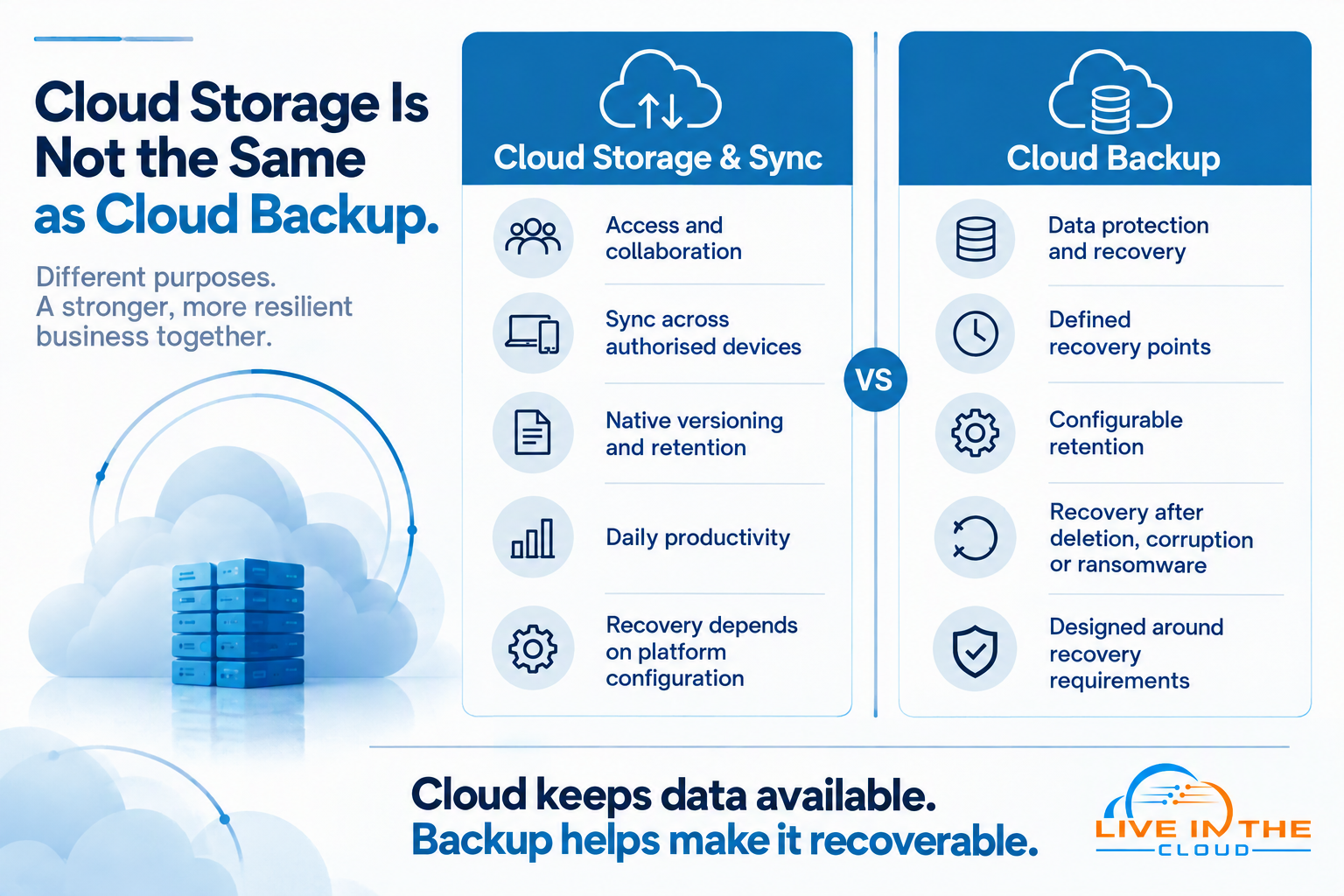
Cloud storage and cloud backup are often discussed as if they are interchangeable. In practice, they solve different business problems.
Cloud storage services such as OneDrive and SharePoint are designed primarily to keep information accessible and support collaboration. Employees can work on documents from different locations, share information with colleagues and synchronise files across authorised devices.
Backup focuses on what happens when that normal environment is no longer enough. Its purpose is to give the organisation an appropriate recovery capability when information is deleted, corrupted, affected by ransomware or otherwise needs to be restored.
The distinction is especially important for UAE companies running hybrid environments. A business may use Microsoft 365 for communication and collaboration, Microsoft Azure or AWS for infrastructure, an on-premises server for a legacy application and additional SaaS platforms for finance, CRM or other business functions. LITC's own UAE managed-services framework recognises that modern environments increasingly span cloud, infrastructure, security, business continuity and user productivity rather than operating as separate technology islands.
|
Consideration
|
Cloud Storage & Native Recovery
|
Dedicated Cloud Backup |
| Primary purpose | Access, collaboration, synchronisation and everyday recovery | Protection and controlled recovery |
| Retention | Determined by the platform and configured policies | Defined according to backup requirements |
| Historical recovery | Depends on the workload and configuration | Designed around defined recovery points |
| Ransomware recovery | Native versioning and retention can support recovery | Provides an additional recovery layer |
| Granular recovery | Varies between applications | Designed to recover protected items or workloads |
| Recovery planning | Often application-specific | Connected to wider RPO, RTO and disaster recovery planning |
The practical question for a business is therefore not simply whether its documents are stored in the cloud. It is whether the organisation can recover the information it needs, from an appropriate point in time, within an acceptable timeframe.
Why Cloud Synchronisation Is Not the Same as Backup
Consider a UAE business that keeps shared commercial documents in SharePoint and allows employees to synchronise their working folders through OneDrive. This is a useful setup for everyday productivity, particularly when teams are spread across different offices or working remotely.
Now imagine that an employee accidentally deletes a critical folder. Alternatively, an account is compromised, large numbers of documents are changed, or ransomware reaches part of a synchronised environment. The business suddenly has a different requirement. It no longer needs convenient access to the latest version of its data. It needs to recover a known-good version.
Cloud platforms provide native controls that can help with many of these circumstances, including retention, versioning and recovery features. However, the appropriate level of protection depends on the workload, configuration and organisation's recovery requirements.
This becomes more important when a business needs to recover information from months earlier, restore data belonging to a former employee, recover a large number of affected documents or return a critical workload to a specific recovery point. At that stage, relying on a general assumption that the information is safe because it is in the cloud is not enough.
A better approach is to document which information matters, understand the recovery capabilities already available and identify where an additional backup layer is justified.
What the Microsoft 365 Outage Actually Taught Businesses
The November outage is a useful example because it highlights a different side of resilience. Reuters reported that the disruption lasted for more than a day and affected essential functions across Outlook, Teams and associated workplace services. Microsoft said the incident was not caused by malicious activity.
A backup would not have prevented that outage. This is an important distinction because backup and business continuity are sometimes treated as though they solve the same problem.
If Exchange Online is temporarily unavailable, having a backup does not make Microsoft's live email service operational again. Businesses need a continuity plan that considers how employees communicate, how essential information is accessed and which workflows can continue while the primary service is being restored.
Backup becomes critical when the underlying data itself needs to be recovered. Disaster recovery becomes relevant when systems or workloads need to be restored. Business continuity looks at how the organisation continues operating while those problems are being resolved.
| What happened? | Primary consideration |
| Important information is deleted or corrupted | Backup and recovery |
| Ransomware affects files or workloads | Cybersecurity plus backup and recovery |
| A SaaS platform becomes unavailable | Business continuity |
| A server or critical application fails | Disaster recovery |
| The business needs to limit potential data loss | Recovery Point Objective |
| The business needs systems restored quickly | Recovery Time Objective |
That wider resilience view is already part of LITC's approach to managed IT. The The Enterprise Guide to Managed IT Services in the UAE (2026) places automated backup, disaster recovery planning and regular testing within business continuity rather than treating backup as a standalone technology purchase.
What Does the Cloud Shared Responsibility Model Mean?
Moving an application to the cloud changes who manages different parts of the technology stack. It does not mean the cloud provider takes responsibility for every aspect of the organisation's data, security and recovery.
The exact division depends on the service being used. Responsibility looks different for infrastructure-as-a-service, platform-as-a-service and SaaS environments.
In Microsoft 365, AvePoint describes Microsoft as responsible for areas such as the physical infrastructure, platform uptime and service-level security, while the customer retains responsibilities covering areas such as backup, access management, compliance configuration and recovery.
For a business, the principle matters more than the terminology. The provider operates the cloud service, but the organisation still needs to make decisions about who should have access to data, how long information should be retained, which workloads need additional protection and how recovery will work when something goes wrong.
This is why buying a cloud subscription should not be confused with having a complete data-resilience strategy.
How Does Cloud Backup Actually Work?
A well-designed backup environment should work quietly in the background, but the decisions behind it need to be deliberate.
The starting point is not selecting a vendor. It is identifying the business systems that need protection and determining how quickly each one needs to recover.
1. Define What Needs Protection
Not every system necessarily needs the same backup schedule or retention policy. Organisations should identify the workloads that would create a material business problem if their information became unavailable.
Depending on the environment, that could include:
- Exchange Online mailboxes;
- SharePoint sites;
- OneDrive accounts;
- Microsoft Teams data;
- virtual machines;
- business databases;
- on-premises servers;
- finance and ERP applications;
- CRM information; and
- other SaaS applications.
A finance database processing frequent transactions may have very different recovery requirements from an archive containing historical marketing material. Treating both workloads identically can either create unnecessary cost or leave the more important system under-protected.
2. Establish Recovery Points and Retention
Once critical workloads have been identified, the organisation can determine how often protection needs to occur and how long recovery points need to remain available.
This should reflect business need rather than an arbitrary default. Some information may only require relatively short operational recovery periods, while other records may need to remain available for considerably longer because of contractual, legal or regulatory requirements.
For UAE organisations, retention should be reviewed against the regime that actually applies to the entity and data involved. The federal UAE PDPL, DIFC and ADGM are not interchangeable regulatory frameworks, and certain sectors have additional requirements.
3. Plan for Granular and Wider Recovery
Not every incident requires an entire environment to be restored. Often, the business simply needs a specific email, folder, mailbox or file.
Other incidents are much larger. A ransomware event, application failure or infrastructure problem may require multiple systems to be recovered in the correct sequence.
Backup architecture therefore needs to support the scenarios that actually matter to the business rather than focusing only on whether copies exist.
4. Test the Recovery
This is the part businesses can easily overlook.
A dashboard showing that last night's backup completed successfully proves that the backup process ran. It does not necessarily prove that the complete business service can be brought back within the required timeframe.
Applications often depend on databases, identities, permissions, networking, certificates and integrations. Recovery testing should therefore verify both the data and the service that depends on it.
RPO and RTO: Two Numbers UAE Businesses Should Define
Two useful measures sit at the centre of backup and disaster recovery planning: Recovery Point Objective and Recovery Time Objective.
Recovery Point Objective, or RPO, asks how much data the business can afford to lose. If a workload has an RPO of four hours, the organisation is effectively saying it needs the ability to recover data no more than approximately four hours old.
Recovery Time Objective, or RTO, asks how quickly the service needs to return. A non-critical archive may tolerate a longer restoration period, while a finance system, customer platform or business-critical application may need to return much faster.
These targets should be set according to business impact. Using the same RPO and RTO for every workload may sound simpler, but it often creates either excessive cost or insufficient protection.
For a multi-site UAE organisation, the conversation might be very practical. If email is inaccessible for an hour, the business may have alternative ways of communicating. If an ERP or order-processing system is unavailable for an entire working day, the commercial impact could be substantially greater.
Recovery priorities should reflect that difference.
Why Cloud Backup Matters for UAE Businesses
UAE organisations are increasingly operating across a mix of SaaS applications, public cloud infrastructure, physical offices, remote users and on-premises systems. LITC's existing Executing a Seamless Cloud Migration in the UAE: A Strategic 2026 Roadmap similarly describes cloud adoption as part of a wider move towards more resilient and scalable operating environments rather than simply a hardware replacement exercise.
That interconnected environment creates several recovery challenges.
Human Error Has Not Disappeared
Cloud technology cannot stop every employee from deleting the wrong document, changing the wrong folder or removing information that later turns out to be important.
Native recovery capabilities may solve many everyday incidents. The organisation still needs to understand how far those capabilities extend and whether they meet its recovery requirements.
Backup provides another recovery layer where the business determines that native controls alone are insufficient.
Ransomware Can Affect Cloud-Connected Workloads
Moving files into the cloud does not remove cyber risk. Modern attacks increasingly involve identities, credentials, endpoints and cloud applications rather than only targeting the traditional office network.
This is why backup should sit alongside controls such as multifactor authentication, privileged-access management, endpoint protection and appropriate identity policies rather than being viewed as a substitute for cybersecurity.
LITC's Zero Trust Security in the UAE: Reducing Risk in a Hybrid World, for example, approaches this problem through explicit verification, least-privilege access and an assume-breach mindset. Those principles are particularly relevant when businesses need to limit how far a compromised identity can reach.
UAE Regulatory Requirements Need Context
It is tempting to say that every UAE organisation has the same data-residency or backup obligations. That would be inaccurate.
The applicable requirements depend on the organisation, its location, its sector and the information being processed. The UAE's federal data-protection framework sits alongside separate regimes in DIFC and ADGM, while health, financial and government-related environments can be subject to additional requirements.
For that reason, backup architecture should not be sold as automatically compliant simply because data is retained for a particular number of years or hosted in a particular location. Businesses handling regulated information should validate retention, residency and cross-border requirements against the rules that specifically apply to them.
What Should a UAE Business Review in Its Backup Strategy?
A useful backup review should begin with the current environment rather than a product catalogue.
Start by identifying the systems the organisation genuinely depends on. Email and Microsoft 365 may be obvious candidates, but finance systems, databases, CRM platforms, ERP applications and file servers can be equally important.
For each important workload, document:
- where the production data is held;
- what native recovery capabilities exist;
- whether additional backup is configured;
- how frequently protection occurs;
- how long recoverable copies are retained;
- who can administer or delete backups;
- how individual items are restored;
- the required RPO;
- the required RTO; and
- when recovery was last tested.
Then test the assumptions behind the document.
Could the company recover an important mailbox after an accidental deletion? Could hundreds of affected documents be restored after a security incident? Could the finance database come back if its production environment failed? Could the recovery still be performed if the administrator who normally manages the system were unavailable?
These questions turn backup from an IT checkbox into a practical business-continuity exercise.
Which LITC Partners Support Cloud Backup and Data Resilience?
There is no reason every organisation should use exactly the same backup platform.
Live in the Cloud ME takes a consulting-led approach to infrastructure, cloud and managed IT. The broader model already reflected in LITC's The Enterprise Guide to Managed IT Services in the UAE (2026) is to understand the environment and business requirements first, then select technologies against those requirements rather than allowing the vendor to dictate the strategy.
Depending on the workload, a business resilience architecture can include technologies across Microsoft 365, Microsoft Azure, AWS, cloud and on-premises infrastructure. The same principle applies to backup: the right solution depends on workload coverage, recovery requirements, retention, security, administration and the wider technology environment.
Through the LITC technology partner ecosystem, the goal is to bring those technologies together around an accountable solution rather than simply sell another licence.
Is Your Cloud Data Backed Up or Simply Available?
The November Microsoft outage highlighted just how much of the modern working day now depends on cloud-based email, collaboration and productivity services. For UAE businesses that have adopted Microsoft 365 and other cloud platforms, this dependence will only continue as more systems and data move online.
That is not an argument against cloud adoption. The more useful response is to become clearer about what the cloud is expected to do and what the organisation still needs to plan for itself.
Saving information in Microsoft 365, Microsoft Azure or another cloud environment forms only one part of resilience. Businesses also need to understand their retention policies, security controls, backup arrangements, recovery objectives and continuity plans. Most importantly, they need to know whether those arrangements work before a real incident puts them to the test.
For a UAE organisation, the practical next step is straightforward: identify the workloads the business cannot operate without, understand how each one is currently protected, define realistic RPO and RTO targets and test whether recovery can actually be completed.
Not Sure Whether Your Cloud Data Is Genuinely Protected?
LITC starts with your business requirements, recovery priorities and downtime targets. We assess your environment, define the right recovery strategy, implement suitable technologies and provide ongoing support as your needs evolve.
Frequently Asked Questions (FAQ)
Is Microsoft 365 a backup?
Microsoft 365 provides important native capabilities around resilience, retention and recovery, but businesses should not assume that this automatically satisfies every backup requirement. The more useful approach is to assess how long information must remain recoverable, what recovery scenarios the organisation needs to support and how quickly important information needs to be restored.
Where those requirements extend beyond the organisation's existing configuration, an additional backup capability may be appropriate.
Is OneDrive a backup?
OneDrive is primarily a cloud storage and synchronisation service with native versioning and recovery functionality. Those capabilities can resolve many everyday problems, but that does not automatically make OneDrive a complete business backup strategy.
Businesses should consider the data involved, required retention period, recovery scenarios and their wider business-continuity requirements before deciding whether native recovery is sufficient.
What is the difference between cloud storage and cloud backup?
Cloud storage is primarily designed to make information accessible and support everyday collaboration. Cloud backup is focused on ensuring that appropriate copies or recovery points are available when information needs to be restored.
The distinction becomes important after accidental deletion, corruption, ransomware or other incidents where the organisation needs to return data to a known-good state.
Does cloud backup protect a business during a Microsoft 365 outage?
Not directly. Backup cannot restore Microsoft's live cloud service when the platform itself is unavailable.
This is why backup and business continuity need to work together. A continuity plan addresses how people continue operating during an outage, while backup addresses situations where protected data needs to be recovered.
What is the 3-2-1 backup rule?
The traditional 3-2-1 backup principle recommends keeping three copies of important data, using two different types of storage or media, with at least one copy held separately or off-site.
The principle remains useful, although modern cloud and ransomware-resilience architectures also need to consider immutability, administrative separation and how quickly information can actually be recovered.
What is RPO in cloud backup?
Recovery Point Objective, or RPO, defines how much recent data an organisation can tolerate losing, expressed in time.
If a critical application has a four-hour RPO, for example, the backup and recovery strategy should be designed so the business can return to a recovery point that is no more than approximately four hours old.
What is RTO?
Recovery Time Objective, or RTO, defines the target period within which a business system or service should be restored following an incident.
A business should normally prioritise RTO according to operational importance. A customer-facing platform or financial application may require much faster recovery than a historical archive.
Does every UAE business need third-party Microsoft 365 backup?
No. There is no single backup architecture that is automatically right for every UAE business.
The decision should be based on the organisation's Microsoft 365 configuration, workloads, recovery requirements, retention needs, security architecture, risk tolerance and relevant regulatory or contractual obligations. For some organisations, native capabilities may satisfy particular requirements. Others may need additional Microsoft or third-party protection.