
Microsoft Entra ID for Businesses: Securing Identity and Access Across the Organisation
Microsoft Entra ID, formerly known as Azure Active Directory, is Microsoft’s cloud-based identity and access management service. It helps organisations manage user identities and control access to applications, data and other resources across cloud and hybrid environments.
For businesses using Microsoft 365, Azure, software-as-a-service applications or a mix of on-premises and cloud systems, identity has become a central security control. Entra ID provides a common layer for authentication, access decisions and identity administration, helping organisations reduce reliance on passwords and apply consistent access policies as their users, devices and applications change.
Product Overview
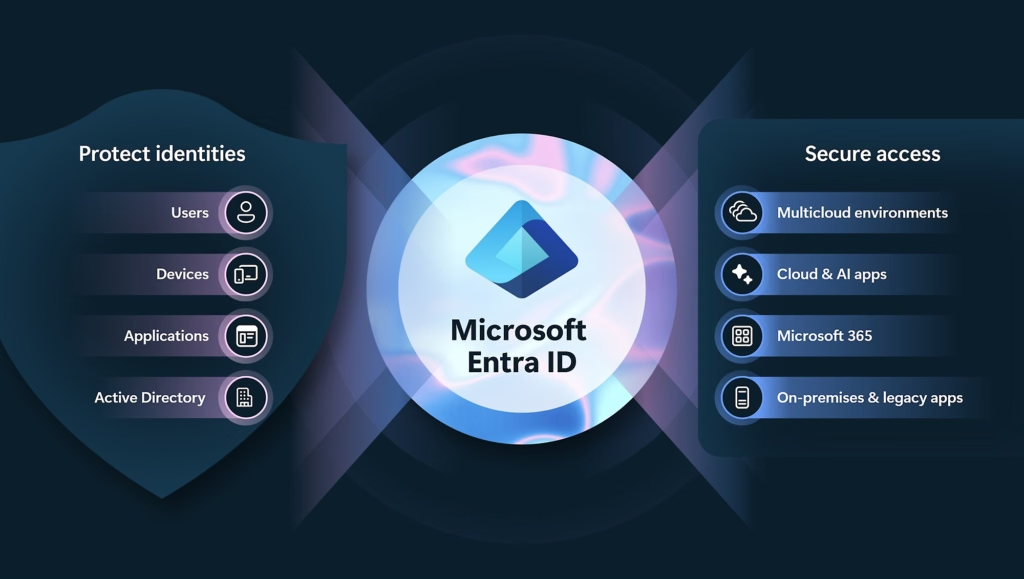
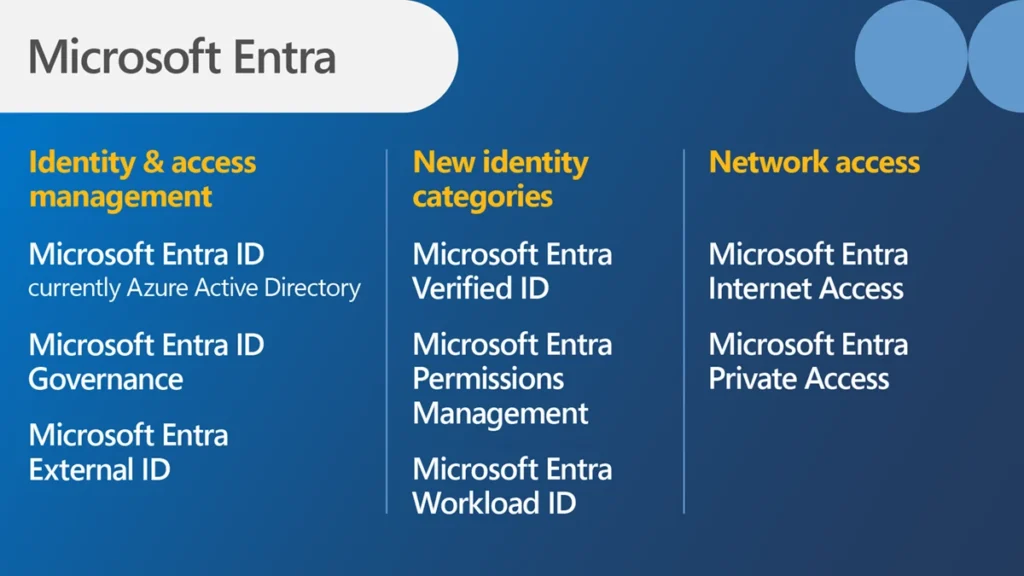
Microsoft Entra ID is part of the wider Microsoft Entra product family. At its core, it provides identity services for employees, customers, partners, applications and workloads. Organisations can use it to create and manage identities, support sign-in to connected resources, and establish policies that determine who can access what and under which conditions.
The service supports cloud identity management while also addressing hybrid environments where organisations still operate on-premises directory infrastructure. Its role extends beyond a simple directory: it provides authentication methods, single sign-on, access governance capabilities and policy-based controls that can form part of a broader Zero Trust approach.
99.99%
service resiliency is guaranteed by Microsoft Entra ID in any given month.
99.2%
of identity compromise risk is reduced by MFA.2
50%
reduction in the likelihood of breaches on addressable cyberthreats.
Key Features
- Single sign-on: Enables users to access connected applications using one organisational identity, reducing repeated sign-ins across supported services.
- Multifactor authentication: Adds an additional verification factor beyond a password to strengthen sign-in security.
- Passwordless authentication: Supports methods designed to reduce or remove password use, including Windows Hello for Business, passkeys based on FIDO2, and the Microsoft Authenticator app.
- Conditional Access: Allows organisations to apply access policies using signals such as the user, application, location, device state and detected risk.
- Identity lifecycle administration: Supports the management of users, groups, roles and access as people join, move within or leave an organisation.
- Application access management: Provides identity and access controls for Microsoft services and other connected cloud or on-premises applications.
- Hybrid identity support: Can work with existing on-premises identity environments so organisations can manage access across hybrid estates.
- Identity governance and privileged access capabilities: Microsoft Entra offers controls that can help organisations review access and manage elevated permissions, subject to the applicable product plan and configuration.
See pricing details
Find the plan that best meets your needs.
Microsoft Entra ID P1
Secure access for any identity with a market-leading cloud identity and access management solution.Single Sign-On and application access
Multifactor authentication (MFA)
Conditional Access
Passwordless and phishing-resistant authentication
Administration and hybrid identity
Employee self-service
Cross-tenant delegated access and configuration
Backup and recovery
Advanced security and usage reports
Verifiable credentials issuance and verification
Microsoft Entra ID P2
Comprehensive identity protection, risk-based access controls and privileged access for critical resources.Includes everything in Entra ID P1
Microsoft Entra ID Protection
Risk-based Conditional Access
Adaptive risk remediation
Premium risk detections
Unified risk
Privileged identity management
Basic entitlement management
Basic access reviews
Microsoft Entra Suite
$3.00
user/month, paid yearly (Annual subscription - auto renews)
Microsoft Entra Suite delivered 131% ROI by unifying identity and network access.
Users benefit from:
- Continuous, adaptive Conditional Access across identities, endpoints, apps, and networks.
- Identity Governance to enforce least privilege access and automate access lifecycles across users and tenants
- Secure Web and AI Gateway to apply identity centric controls to web and AI traffic
- Real-time risk detection using unified identity and network signals
Choosing the Right Entra ID Plan?
Enquire on Email
Enquire on WhatsApp
Ideal Use Cases
Microsoft Entra ID is relevant where organisations need a consistent identity layer across users, applications and infrastructure. The appropriate design depends on the existing directory environment, application portfolio, security requirements and Microsoft licensing already in place.
- Businesses using Microsoft 365 that want stronger sign-in controls and central identity administration.
- Hybrid organisations managing both on-premises directory services and cloud applications.
- Organisations seeking to introduce multifactor authentication, passwordless sign-in or risk-based access policies.
- Companies providing employees, contractors or partners with access to multiple business applications.
- IT teams reviewing user access, administrative roles and account lifecycle processes as the organisation grows.
- Organisations developing a Zero Trust security programme in which access is verified explicitly rather than assumed.
Why It Matters
A user account is often the route through which legitimate access is granted, which also makes identity a target for password attacks, phishing and account misuse. Protecting the sign-in process is therefore closely connected to protecting email, business applications, cloud workloads and sensitive information.
Centralised identity and access management can also improve operational consistency. When authentication methods, access policies and account lifecycle processes are managed deliberately, IT teams are better placed to remove unnecessary access, respond to role changes and apply controls according to business risk. However, the outcome depends on sound configuration, accurate identity data and clear ownership. Enabling a feature without planning policy exceptions, recovery methods, legacy authentication and administrator access can create security gaps or user disruption.
LITC ME View
Live in the Cloud ME views identity as a business-wide control rather than a standalone sign-in tool. Before adopting or expanding Microsoft Entra ID, organisations should map their users, privileged roles, applications, devices, external access and current authentication methods. The next step is to match required controls to the appropriate Microsoft plan, then introduce policies in stages with testing, monitoring, emergency access arrangements and clear user communication. As a consulting-led, vendor-neutral technology advisor, LITC ME can help businesses assess identity requirements in the context of their wider Microsoft 365, Azure, cybersecurity and managed IT environment without treating licensing alone as the security strategy.
Related Product Resources
The following Microsoft resources provide additional product, authentication and tenant-management information:
Conclusion
Microsoft Entra ID gives organisations a structured way to manage identities, authentication and access across cloud and hybrid environments. Its practical value comes from applying the right controls to the right users and resources, not simply switching features on. Businesses considering Entra ID should begin with an identity and application assessment, confirm licensing and integration requirements, prioritise privileged and high-risk access, and plan a phased implementation that supports both security and day-to-day usability.